
Quick Answer: To set up a VPN at home for remote work, get your company’s VPN details from IT, add them in the VPN client or in your system’s VPN settings, connect, then test access to an internal resource. A consumer VPN app like NordVPN is a separate tool for privacy and routing. It doesn’t connect you to your office network.
You’ve just started a remote job. IT sends one email: “Connect to the VPN before you work.”
No link. No steps. You search for VPN apps and find hundreds. Which one connects you to your company’s network?
The honest answer is that it depends on which kind of VPN you need. Most people mix up three different things.
This guide explains the difference, then walks through each setup in order. It also covers what to do when a VPN starts slowing your cloud uploads.
What Is a VPN for Remote Work?
A VPN for remote work is an encrypted connection between your device and another network. It either links you to your employer’s network, hides your traffic through a commercial provider, or connects you back to your own home network. Each type solves a different problem.
A VPN is defined as an encrypted tunnel that carries your traffic across the open internet. There are three types you’ll meet:
- Company VPN. It connects you to your employer’s network so you can reach internal tools and files. IT sets it up.
- Consumer VPN. An app such as NordVPN that routes your traffic through a provider’s servers. ESET notes that standalone VPN services are mostly aimed at privacy or bypassing filters, not at work-from-home access.
- Home VPN server. It lets you reach your own home network, such as a NAS, from outside.
Most remote workers need the first one. Some also want the second.
Why Do Remote Workers Need a VPN at Home?
Remote workers need a VPN because many company tools only accept connections from inside the company network. A VPN encrypts the traffic and makes your home device behave as if it were in the office. It also protects data on shared or weak home networks.
Without it, you may see:
- Internal sites that simply won’t load
- File shares that fail to open
- Security tools that block your login
Comparitech describes remote access VPNs as letting employees reach the company intranet from home or anywhere using personal computers or phones. A VPN is also a security layer on a home network you don’t fully control. comparitech
How Do You Set Up a VPN at Home for Remote Work?
Set up a work VPN by getting the server address, VPN type and sign-in method from IT, adding the connection in your VPN client or system settings, connecting, and testing an internal resource. Always use the details IT provides, never guess them.
These steps use Windows 11. Menu names can differ between versions, so check yours.
- Ask IT for the details. You need the VPN type, the server name or address and the sign-in method. Many companies also supply an installer or a ready-made profile. If IT gives you a client, use that and skip to Step 3.
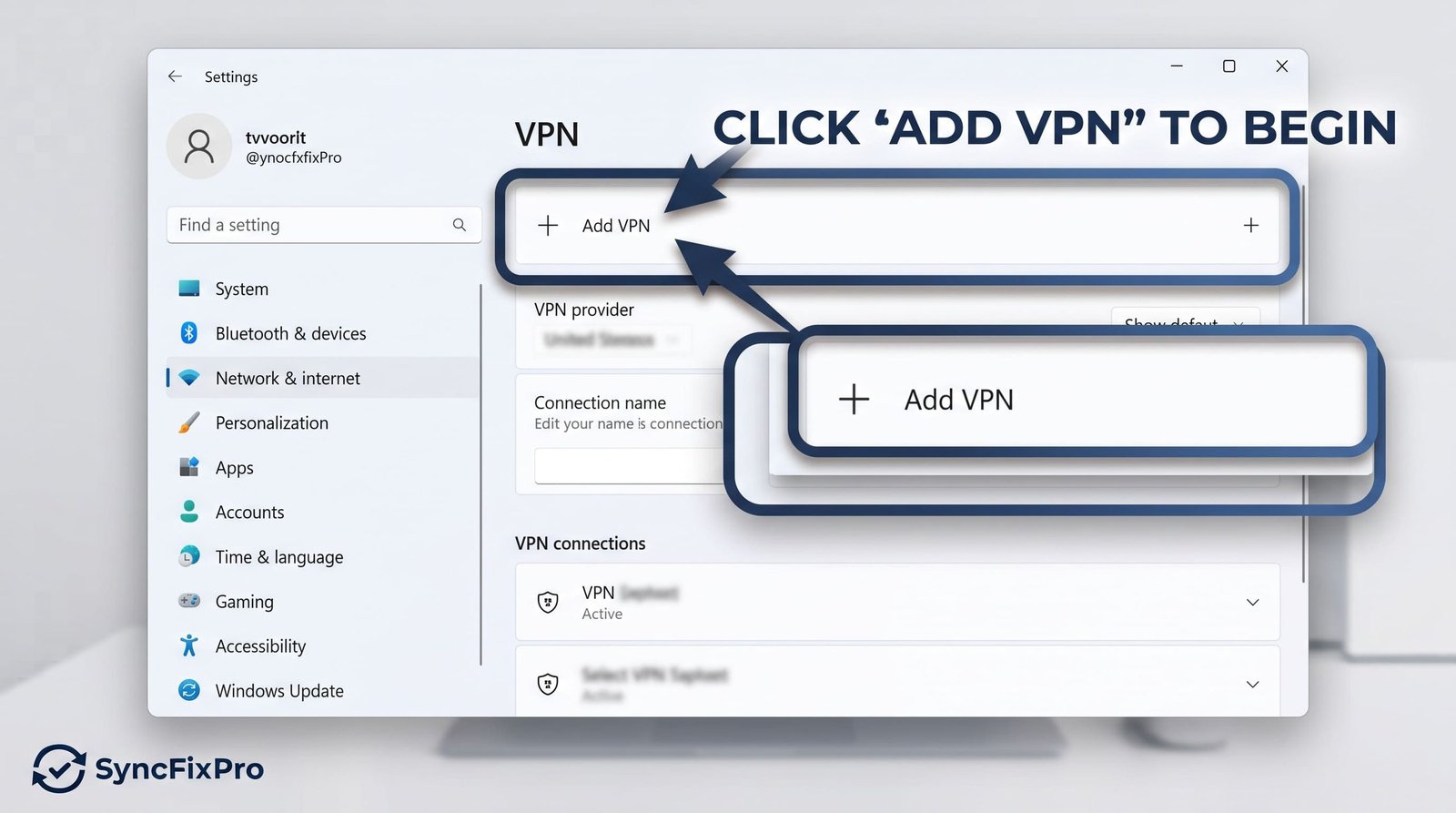
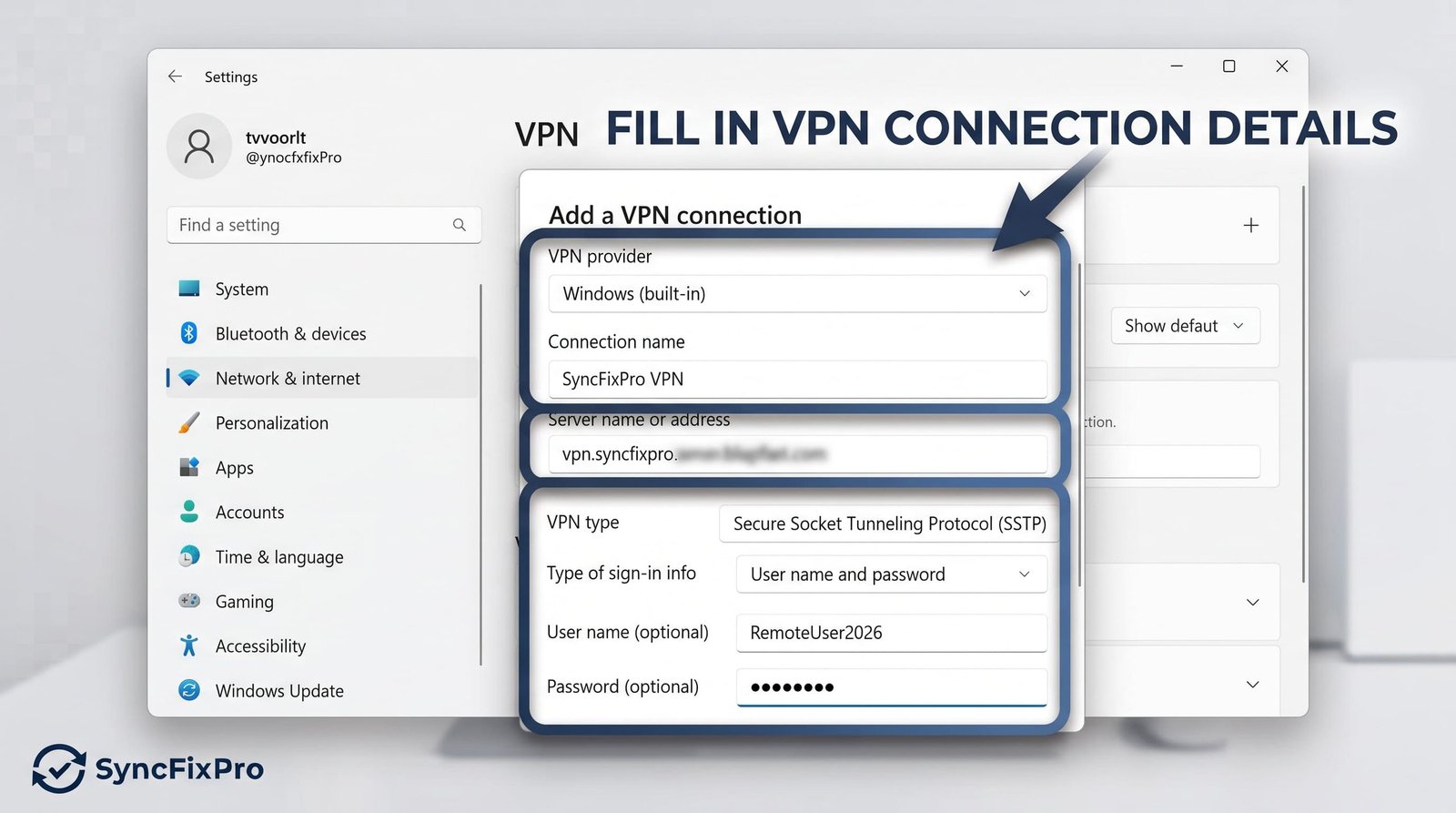
- Add the connection. Go to Settings → Network & internet → VPN → Add VPN. Enter the provider (Windows built-in), a connection name, the server name or address, the VPN type and your sign-in details. On a Mac, go to System Settings → VPN → Add VPN Configuration.
- Connect. Select the connection and click Connect. Sign in with your work credentials.
- Complete multi-factor authentication if asked. Most companies require it.
- Test an internal resource. Open an internal site or file share that failed before. If it loads, the tunnel works.
- Decide on auto-connect. If IT allows it, turning on connect-at-startup means you won’t forget the VPN. TechRadar’s guide also treats this as an early decision.
- Test your cloud tools while connected. VPNs can slow or break sync. See OneDrive error 0x8007016A and Google Drive upload stuck at 99% if something stalls.
- ESET’s guide says the router and laptop side takes about half an hour to an hour when you build it yourself. With a company-supplied setup, it usually takes minutes. welivesecurity
Method 2: How Do You Add a Personal VPN App Alongside Your Work VPN?
To add a personal VPN app, check your IT policy first, install the app, pick a protocol, turn on the kill switch, and test your IP address. Don’t run it at the same time as the work VPN unless IT confirms they don’t conflict.
A consumer VPN doesn’t replace your company VPN. People use one for privacy on public Wi-Fi or to test a different route. Our Google Drive slow upload VPN fix guide covers when that route helps.
- Check your IT policy. Work devices often forbid extra VPNs.
- Install the app and sign in.
- Choose a protocol in the app’s settings, then test with a nearby server.
- Turn on the kill switch, if your app has one. It blocks traffic if the VPN drops.
- Check your IP address with and without the VPN. The two should differ.
- Connect in the right order. Test the work VPN first, then add the personal one only if IT approves.
- Use split tunneling to reduce conflicts. It’s available on some platforms. If it misbehaves, see NordVPN split tunneling not working.
Method 3: How Do You Set Up a Home VPN Server?
A home VPN server lets you reach your home network from outside. You can run it on a router that supports it or on a computer, then add port forwarding and dynamic DNS. It’s an advanced setup, and most remote workers don’t need it.
Use this only if you want to reach a home NAS, printer or files while traveling.
- Choose the host. A router with a built-in VPN server is simpler. A computer also works.
- Pick a modern protocol. Guides warn that PPTP is easy to set up but less secure, so avoid it. simcentric
- Set up port forwarding on the router so VPN traffic reaches the host.
- Set up dynamic DNS, so you can find your home address when your ISP changes it.
- Create user accounts with strong passwords.
- Test from outside. Use a phone hotspot, not your home Wi-Fi.
Your home’s upload speed limits this setup. Use our Cloud File Size & Transfer Time Calculator to check whether your line can handle the files you plan to move.
How Do You Keep a Home VPN Working for Remote Work?
To keep a home VPN working, update the client, retest after major Windows updates, keep your router firmware current, and note your baseline speeds. A change in speed or access is easier to diagnose when you know what normal looks like.
Here is what I’d do on any work machine:
- Update the VPN client whenever IT releases a new version.
- Retest after major Windows updates. Updates have broken VPN connections before. Microsoft issued fixes for broken VPN connections in Windows 10 and 11 through the KB5037771 and KB5037768 updates. geekchamp
- Keep your router firmware current.
- Record your baseline. Note your normal speeds with the VPN on and off.
- Plan big transfers. Large uploads over a VPN take longer. Our guide on how to transfer large ZIP files from Mac to Windows has tips for moving big files.
Conclusion
Start with your company’s VPN details and test an internal resource. Add a personal VPN only if your IT policy allows it. Record your baseline speeds so you can spot problems early.
FAQ
Below are the more related questions.
Still have more questions?
Feel free to reach out to us through our contact page or leave a comment.
contact page
2 thoughts on “How to Set Up a VPN at Home for Remote Work — Complete Guide (2026)”